
IBC 2026 in review: Two awards, a live rally and more ways to create from every production
How can you optimise a live event once the main broadcast is underway?
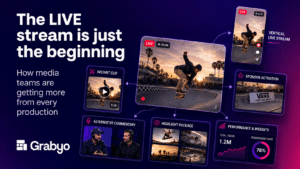
That was the question behind much of what we showed at IBC 2026. A rights holder might need a programme feed, a vertical stream for mobile viewers, coverage in another language and clips ready to share while the event is still live. Each serves a different audience, but producing them should not mean building a separate operation from scratch.
At Stand 5.A20, we introduced the latest updates to Grabyo Live and Grabyo Studio, demonstrated new production and editing workflows, and put them to work with live coverage of Targa Newfoundland. It was also a memorable show for the team with Grabyo Live winning two awards during IBC.
Two awards for Grabyo Live
Grabyo Live received the Best Creation & Management Award at the IAMT Impact Awards for Grabyo Live: Next Generation Cloud Production. It also won a Best of Show Award in the AVTechnology category at IBC 2026.
We are pleased to see Grabyo Live recognised at its official launch. The platform brings the tools needed to run a live production into a browser-based environment, while giving teams more flexibility in how they manage people, resources and outputs.
That flexibility matters because the demands on live production teams keep growing. They are being asked to cover more events, support more platforms and create content for audiences with different viewing habits. The aim with Grabyo Live is to make those workflows more manageable, whether a team is producing one programme or several versions of the same event.
Targa Newfoundland brought the workflow to life
Our most visible demonstration at IBC was happening thousands of kilometres away.
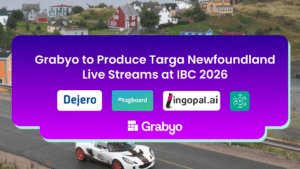
For the first time in its 25-year history, Targa Newfoundland was broadcast live. The Dejero-led initiative brought together a wide group of partners to carry coverage from the rally’s remote roads to viewers and to the show floor in Amsterdam.
Grabyo received feeds from the primary broadcast and used Grabyo Studio to produce additional streams. That distinction is important: our team was building on the main production to create new versions of the coverage for different audiences.
Working with Tagboard, Lingopal and AWS Elemental Inference, we demonstrated streams with their own graphics, language and framing. Tagboard supported the visual presentation, Lingopal enabled live language localisation, and AWS Elemental Inference helped create a vertical view that followed the rally action for mobile audiences.
Visitors to our stand could see that production taking place while the rally was live. It made the possibilities of a multi-output workflow much easier to understand. The same event could serve an audience watching a traditional horizontal programme, someone following on a phone, and a viewer who wanted coverage in another language. The production team could make deliberate choices about how each version looked and sounded.
Targa was also a good reminder that these workflows depend on collaboration. Dejero and the wider partner ecosystem made it possible to bring the rally live from Newfoundland. Grabyo and our partners then showed how to make more from that coverage once it reached the cloud.
→ Read news coverage of the TARGA Newfoundland livestream.
A new generation of Grabyo Live
The Targa production was one example of a broader set of capabilities we demonstrated in Grabyo Live.
One of the biggest changes is the ability to create independent video and audio mixes from a single control room. A team can produce a main programme, a clean feed for a partner, a version with different commentary or a stream tailored to a vertical platform. They can also configure encoding settings for the requirements of each output, including resolution, bitrate and audio layout.
This gives production teams more room to plan around the audience and destination. A broadcast partner may need a high-quality clean feed. A social audience may benefit from a different layout, framing and graphics. An international audience may need localised commentary or presentation. Grabyo Live gives operators the tools to create those versions within a connected workflow.
We also showed how the new Control Room brings production management and operation closer together. Teams can navigate shows and assets from one place, see production status in real time and access a shared asset library. Updates within the interface, including faster asset import and clearer controls for switching layers, are intended to make everyday operation easier when a show is live.
For sports production, instant replay was another focus. Operators can create replays from multiple camera angles, control slow-motion playback and build playlists during an event. Support for hardware controllers, including a T-bar and jog wheel, gives teams familiar ways to work when timing is tight.
ISO recording and review have become more flexible too. Teams can capture sources and outputs for later use, including versions with different graphics or audio. Waveforms and multi-angle review help operators inspect what happened and select the material they need after a key moment.
Behind the scenes, enhanced user management gives production managers more control over who can access each part of a workflow. Roles and groups can be set around the responsibilities of an operator or team, which is particularly useful for productions involving people in different locations.
Taken together, these updates are about giving teams more control: over the live show, over the people working on it and over the versions they create from it.
→ Explore what’s new in Grabyo Live.
Keeping editors in control in Grabyo Studio
The work does not stop when a live moment has gone to air. Teams also need to find it, adapt it and get it in front of the right audience quickly.
At IBC, we showed a series of updates to Grabyo Studio designed around that process, particularly for vertical video and live clipping.
AI Smart Cropping and tracking can create a first pass at reframing horizontal footage for a vertical screen. Editors can then refine the result themselves, adjusting the frame with keyframes or mouse tracking and controlling how the movement and zoom feel. AI helps with the starting point; the editorial decisions remain with the person making the clip.
New vertical layouts give teams more choice in how to present the action. They can use a full-screen crop or a two-box composition, adjusting each part of the frame to suit the footage. Blur padding offers another option when keeping the full horizontal picture is more useful than cropping it, while social safe areas help keep the important content clear of on-screen platform controls.
We also demonstrated AI Smart Captions. Teams can now generate captions, review and edit the transcript, adjust how the text appears and prepare versions for different languages and aspect ratios. That makes captions part of the editing workflow, with room to check and refine the result before it goes out.
Other updates help with the smaller tasks that add up during a busy live event. Editors can use audio waveforms to find precise moments across tracks, access campaign assets while clipping, and export a group of marked moments as either separate clips or one highlights package. Enhanced overlays and reusable templates help keep the visual treatment consistent across those pieces of content.
These improvements give teams more ways to work quickly without giving up control over the finished result.
→ See the latest Grabyo Studio updates
One event, more possibilities
IBC gave us the opportunity to show both sides of the workflow: producing live coverage for different audiences, then turning its best moments into content for the platforms where those audiences spend their time.
Targa Newfoundland made that tangible. Grabyo provided the environment for creating additional versions of the rally coverage, while the wider demonstrations showed how production teams can manage multiple outputs, work with vertical video and move quickly from live action to clips.
The two awards were a brilliant moment for everyone who has worked on Grabyo. Just as valuable were the conversations on the stand about how these tools could fit into real productions.
We’ll be sharing videos from IBC soon, including a closer look at the workflows we demonstrated. In the meantime, if you’d like to see how Grabyo Live and Studio could work for your events, get in touch with our team, or join us at one of our upcoming events.